



1. Build a Workspace That Supports Your Everyday Goals
A comfortable workspace can make a meaningful difference to how you approach your daily responsibilities. Whether you work from home, study for exams, manage business projects or spend hours at a computer, your surroundings influence how easily you concentrate and organise your tasks. An uncomfortable chair, an unsuitable keyboard or a poorly positioned mouse can make long working sessions feel unnecessarily tiring.
ProtoArc focuses on workspace products designed around ergonomics, convenience and modern working habits. Its collection includes ergonomic office chairs, wireless keyboards, computer mice, trackpads and accessories that help people create more practical work environments. The brand caters to different needs, from professionals with dedicated office spaces to students and remote workers who require flexible equipment.
Creating a better setup does not necessarily mean replacing everything on your desk. Sometimes, changing the way you interact with your computer or choosing a chair with more suitable adjustments can make your workspace feel significantly more functional. The important thing is to understand which parts of your current setup need improvement.
With ProtoArc, you can explore different products according to your workspace, working style and personal preferences. By combining comfortable seating, suitable input devices and an organised desk, you can build an environment that supports focused work throughout the day.
2. Discover the Benefits of Ergonomic Keyboards and Mice
Keyboards and mice are among the most frequently used accessories in any computer setup. However, standard designs may not suit everyone’s hand position, working habits or comfort preferences. When you spend several hours typing, navigating spreadsheets or editing documents, choosing suitable equipment becomes an important part of creating a practical workstation.
ProtoArc offers a variety of ergonomic keyboards and mice designed for different users. Its keyboard collection includes models with split layouts, compact designs and wireless connectivity. Depending on the product, features may include adjustable tilt, wrist support, backlighting and the ability to connect to multiple devices. These options allow users to compare different layouts and choose a keyboard that suits their everyday activities.
The mouse collection includes vertical mice, trackball designs and conventional wireless options. A vertical mouse encourages a different hand position, while a trackball allows cursor movement through a stationary control mechanism. Both designs provide alternatives for people who want to explore different ways of navigating their computers.
Comfort remains personal, so no single keyboard or mouse will suit everyone equally. Before purchasing, consider your hand size, preferred grip, desk space and operating system. You should also check connection methods, device-switching features and battery requirements.
Selecting equipment that feels natural to use can make everyday computer tasks more convenient. Combined with regular breaks and sensible desk positioning, appropriate peripherals can contribute to a more comfortable working routine.
3. Choose an Ergonomic Office Chair for Better Sitting Comfort
A chair is one of the most important elements of a workstation, particularly for people who spend much of the day sitting at a desk. The wrong chair may leave you constantly adjusting your position or struggling to find a comfortable sitting arrangement. A well-designed office chair, on the other hand, can help you establish a more supportive working environment.
ProtoArc offers ergonomic office chairs designed with adjustability and different body types in mind. Depending on the model, available features can include adjustable seat depth, lumbar support, headrests, backrest adjustments and armrests. These features allow users to personalise the chair according to their height, desk arrangement and sitting preferences.
When comparing office chairs, pay attention to more than appearance. Seat depth should allow you to sit comfortably without excessive pressure behind your knees, while the backrest should provide suitable support. Adjustable armrests can help you position your arms more comfortably when typing, and a suitable chair height can make it easier to keep your feet supported.
ProtoArc’s chair range includes models such as the EC200 and EC300, with different adjustment options. Reviewing the specifications of each model can help you determine which features matter most for your workspace. It is also worth checking the chair’s dimensions and weight capacity before making a decision.
A comfortable chair works best when combined with an appropriately positioned desk and monitor. Rather than expecting a chair alone to solve every discomfort, consider your entire workstation and make adjustments that support a balanced sitting posture.
4. Make Remote Work and Business Travel More Flexible
Modern work is no longer limited to a traditional office. Many professionals move between home offices, shared workspaces, meeting rooms and travel destinations. Students may also switch between their desks, classrooms and libraries. In these situations, portable computer accessories can make it easier to maintain familiar working habits wherever a suitable workspace is available.
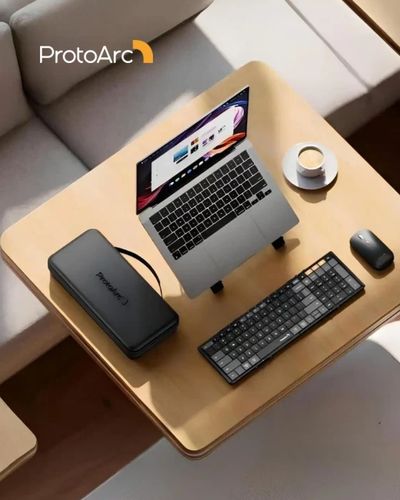
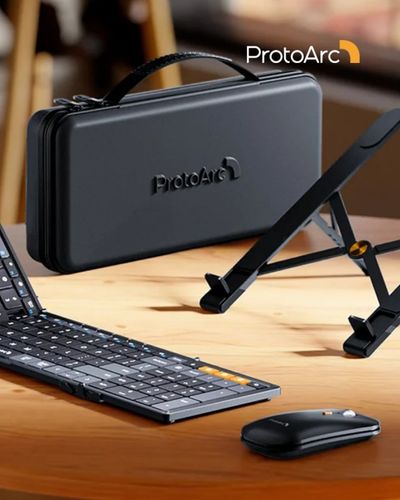
ProtoArc’s Travel Series includes foldable keyboards and compact accessories designed for people who need greater mobility. Products such as the XK01 foldable keyboard and XKM01 keyboard and mouse combination offer alternatives to carrying full-sized desktop equipment. Depending on the model, features may include wireless connectivity, compact construction and support for multiple paired devices.
A foldable keyboard can be useful when you need to type longer documents on a compatible tablet or mobile device. Pairing it with a portable mouse can make navigation more convenient, particularly when working with spreadsheets, presentations or browser-based applications. Some combinations also include a carrying case or other accessories to simplify transportation.
Before choosing portable equipment, consider the devices you use most often. Check whether the keyboard layout matches your typing preferences, whether the mouse is comfortable for extended use and whether your computer or tablet supports the required connection method. Battery life, charging arrangements and the overall packed size are also worth considering.
A portable workspace does not need to be complicated. By choosing a few compatible accessories, you can create a familiar working arrangement in different locations and move between tasks with greater convenience.
5. Improve Productivity with a More Organised Desk Setup
An organised desk can help you concentrate on your work without constantly searching for accessories or moving equipment out of the way. A cluttered surface may not always affect productivity, but a workspace designed around your routine can make everyday tasks easier to manage. Good organisation also helps you use the available space more effectively, especially in smaller home offices or shared rooms.
ProtoArc offers products that can contribute to a more functional desk arrangement, including wireless peripherals, ergonomic mouse pads, trackpads and accessories for compatible office chairs. Wireless keyboards and mice can reduce the number of cables running across the desk, while a suitable mouse pad with wrist support may provide a more comfortable surface for everyday navigation.
Your monitor, keyboard and mouse should be arranged according to the tasks you perform. Keeping frequently used items within easy reach can reduce unnecessary movement, while positioning the screen at a comfortable viewing height may help you avoid repeatedly leaning forward. If you regularly switch between a laptop, tablet and desktop computer, accessories with multi-device connectivity may also simplify your setup.
Lighting and storage deserve attention as well. Adequate lighting helps you read documents and view your screen comfortably, while simple organisers can prevent stationery and cables from taking over your work surface. Even a small desk can become more functional when every item has a clear purpose.
Rather than purchasing accessories simply because they look attractive, identify the problems you want to solve. A thoughtful selection of products can help create a workspace that feels organised, comfortable and suited to your daily responsibilities.
6. Find the Right ProtoArc Products for Your Working Style
Choosing workspace equipment becomes easier when you begin with your specific requirements. A person who spends most of the day writing may prioritise keyboard comfort, while someone who frequently works with spreadsheets might prefer a mouse with precise controls and convenient scrolling. Remote workers may value portability, whereas people with dedicated home offices might focus on chair adjustments and long-term desk comfort.
ProtoArc brings together several product categories, making it possible to explore different combinations for home, office and travel. If you are starting with a basic computer setup, a comfortable keyboard and mouse may be useful first purchases. If sitting comfort is your main concern, comparing the available office chairs could be a better starting point. Those who frequently travel can explore foldable keyboards and compact wireless accessories.
Before ordering, review the specifications, dimensions, compatibility information and warranty conditions for your chosen products. Think about how often you will use each feature and whether the equipment fits your existing desk. Checking these details can help you avoid unnecessary spending and select products that offer practical value.
It is also worth remembering that ergonomics involves more than equipment. Taking regular movement breaks, adjusting your chair and monitor, and changing positions throughout the day all contribute to a more balanced working routine. The right accessories can support these habits, but they work best as part of a thoughtfully arranged workspace.
Whether you are setting up a home office, upgrading your computer accessories or preparing for more flexible work, ProtoArc offers a range of options to explore. Start with your everyday needs, compare the available designs and create a workspace that makes working and studying feel more comfortable.